


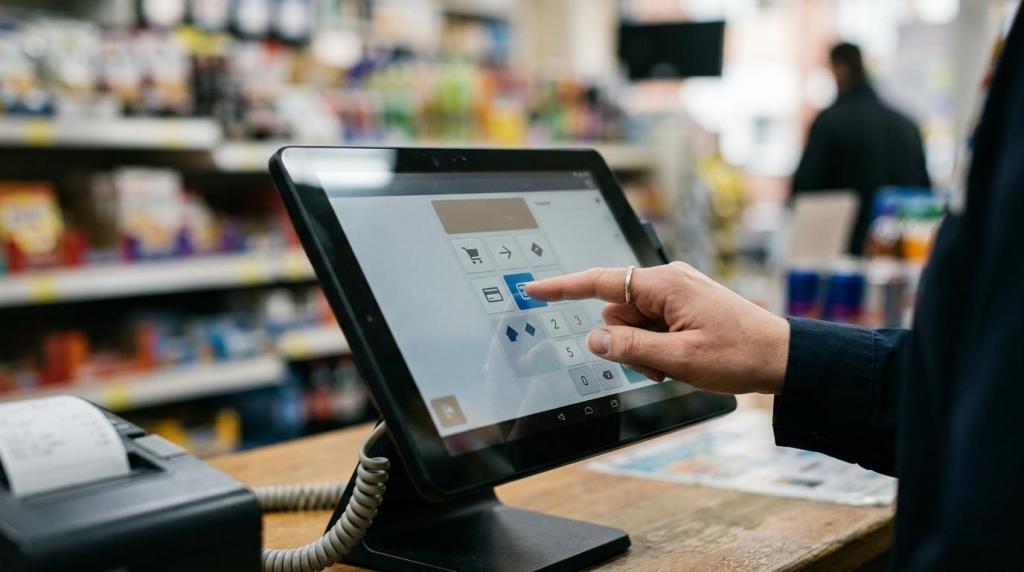
If you run a small retail location, you do not need fish game software that looks impressive in a demo but creates friction at the counter, adds risk, or forces you to buy hardware you never wanted.
You need software that fits the way your store actually works.
That means three priorities rise to the top right away: compliance controls, point-of-sale workflow, and low-friction deployment. For a small store, those are not side issues. They shape how fast you can launch, how smoothly staff can operate, and how confidently you can manage promotional gameplay in a physical location.
Why fish game software for small stores has changed
Small stores are operating in a tighter environment than they were a few years ago. Margins matter more. Staffing is leaner. Customers expect quick transactions. Owners want tools that do more than run a game on a screen.
At the same time, sweepstakes-style promotions in the United States come with clear legal and operational expectations. The Federal Trade Commission has long stated that a sweepstakes cannot require a purchase to participate. If your store is offering promotional gameplay, your software should help you stay inside that framework, not leave your staff to manage it with manual workarounds and inconsistent store practices.
This is why fish game software now has to do more than present gameplay. It should support the full retail process, from player account access and redemptions to recordkeeping and store controls.
Fish game software compliance features your store should expect
For small stores, compliance is not a document you file away. It is part of daily operations.
If your system does not help you manage “no purchase necessary” participation, clear store rules, and access controls, you are asking front-line staff to carry too much risk. That is not efficient, and it is not smart business. The FTC has also warned about deceptive sweepstakes promotions that imply a purchase is required or improves the odds of winning. Your software should reduce that risk by making compliant workflows easier to follow every day.
That starts with structure. Your platform should let you set rules at the account, kiosk, and store level so the same standards apply every shift. If you operate more than one location, it should also let you apply settings across stores without rebuilding everything by hand.
A practical compliance-minded setup often includes:
- no-purchase participation controls
- age gates
- location controls
- redemption records
- visible promotional terms
- user permissions for staff
You should also pay attention to interface design. If a system buries disclosures, makes alternate entry methods hard to process, or pushes staff toward shortcuts, it creates avoidable exposure. Clean workflows matter just as much as legal language.
Point-of-sale workflow matters as much as the game itself
In a small store, the point of sale is where your business wins or loses efficiency. The Small Business Administration defines point of sale as the place where retail transactions happen, and that is exactly where fish game software must perform well.
If gameplay is disconnected from transactions, staff end up bouncing between tools, handwritten notes, and memory. That slows service and increases mistakes. A customer who wants to fund play, check balances, redeem winnings, or resolve an account issue should not trigger a long process behind the counter.
You want a system that treats the game and the store transaction flow as one operating environment.
That usually means the software should support the retail actions your team handles most:
- Account access: quick player lookup, balance visibility, and profile checks
- Credits and promotions: fast issuance tied to your current offers and rules
- Redemptions: clear processing steps with records staff can verify
- Shift controls: permissions, cashier accountability, and transaction logs
- Receipts and history: audit-friendly reporting for disputes or reviews
This matters even more in stores that already sell other products. If you run a smoke shop, convenience store, gas station, bar, lounge, or kiosk-based location, your staff is rarely dedicated to one task. They are serving regular retail customers, watching store flow, and managing promotional play at the same time. Fish game software should simplify that multitasking, not turn it into a training problem.
What small stores should look for in fish game software
A short checklist can help you separate retail-ready platforms from systems that are too heavy, too narrow, or too risky.
| Need | Why it matters for a small store | What to look for |
|---|---|---|
| Compliance controls | Reduces staff mistakes and inconsistent handling | No-purchase workflows, age gates, geofencing, configurable modes |
| POS integration | Keeps transactions fast at the counter | Player accounts, redemptions, cashier tools, reporting |
| Browser-based setup | Cuts hardware and support burden | Cloud access, web login, no local server requirement |
| Fast launch | Helps you start revenue quickly | Simple onboarding, templates, remote setup |
| Reporting | Gives you visibility without manual spreadsheets | Transaction history, store summaries, multi-location reporting, promotion tracking |
| Multi-location tools | Keeps growing operators organized | Central settings, distributor tools, location oversight |
| Support access | Small teams need quick answers | 24/7 support and practical troubleshooting |
If a vendor cannot explain how these areas work in day-to-day retail operations, you should keep looking.
Browser-based fish game software reduces hardware pressure
Many small stores do not want extra servers, custom local networks, or a back room full of equipment that only one technician can touch.
That is why browser-based fish game software stands out. A web-based system can run on standard devices and usually fits better into locations with limited space, limited IT support, and limited patience for technical maintenance. You avoid tying your business to fragile local infrastructure when a lighter deployment model can do the job.
This approach also supports speed. If your platform is cloud-based, you can often launch faster, manage updates centrally, and reduce the need for on-site service calls. For a small operator, that is not just convenient. It protects your time and lowers operational drag.
The strongest deployment model for small stores is usually built around:
- standard PCs or kiosks
- browser access
- centralized updates
- no special server room
- remote management tools
A web-based platform also makes scaling easier. If you open a second location or add a kiosk setup, you do not want to rebuild your system from scratch.
Connectivity still matters, even with lightweight deployment
Lightweight does not mean careless. Your software still depends on stable internet performance and smart network planning.
The FCC now uses a 100/20 Mbps benchmark when discussing advanced broadband capability. That does not mean every store needs to overbuild its internet service on day one, but it does signal where business connectivity standards are heading. If your location handles browser-based operations, reporting, customer-facing screens, and standard business traffic at the same time, you should think about connection quality as part of your operating plan.
Direct questions before you commit:
- Session stability: what happens if the connection drops briefly?
- Reconnect behavior: how quickly do terminals return to service?
- Bandwidth expectations: what does the vendor recommend for your store size?
- Remote troubleshooting: can support diagnose issues without an on-site visit?
A small store should not need an in-house IT team to run fish game software well.
Promotional flexibility helps you compete locally
Small stores often win by being quick to adapt. You may want to run different promotions by daypart, customer segment, or location type. A rigid system makes that hard, and a hard-to-change system usually leads to missed opportunities.
Your software should let you create and adjust promotional structures without a long development cycle. That can include templates, configurable offers, and store-level controls that match how your location operates. The key is flexibility with guardrails. You want room to market effectively without losing control over how promotions are applied.
This is where customizable software becomes a business tool rather than just a game platform. If you can update promotions quickly, test what works, and review results in reporting, you gain a practical edge over operators who are still managing offers manually.
Reporting should help you manage, not just record
Too many platforms treat reporting as an afterthought. Small stores cannot afford that. You need fast visibility into what happened during a shift, how promotions performed, which terminals were active, and what redemptions were processed.
Good reporting helps with daily management first. It should answer basic operational questions without requiring spreadsheet cleanup every night. You should be able to review activity by user, terminal, promotion, and location. If a customer disputes a balance or a redemption, you need a clean record.
Strong reporting also supports better decisions over time. You can spot patterns in usage, identify busy periods, review staff consistency, and adjust store hours or promotions based on actual data rather than guesswork.
That is especially valuable if you are planning to grow.
Multi-location and distributor features are no longer just for large operators
Even if you operate one store today, you should think ahead. A platform that only works for a single location can become a bottleneck faster than you expect.
If you add a second store, manage kiosks across several sites, or work within a distributor network, centralized oversight becomes essential. You want location-level controls, shared templates, and reporting that rolls up cleanly while still preserving store-specific detail.
This does not mean you need an enterprise platform stuffed with features your team will never use. That same balance shows up in other retail systems: Mapog’s review of store locator tools for multi-location retailers highlights how quickly fragmented location data becomes a problem when a business grows beyond one site.
It means you should choose software that can scale with your business without forcing a migration later.
A scalable fish game software setup should give you room to handle:
- single-store operations
- multi-location reporting
- kiosk management
- user role controls
- distributor-level visibility
Growth is easier when the software does not need to be replaced each time your footprint changes.
Staff training should be simple and repeatable
In a small retail environment, training time is expensive. If your system takes weeks to explain, it is already working against you.
You want software that new staff can learn quickly, with clear steps for account actions, redemptions, promotion handling, and customer-facing questions. Consistent menus, readable transaction history, and role-based permissions all help reduce errors. They also make shift changes smoother.
This is one area where simpler technology often wins. A clean browser-based interface, guided workflows, and centralized settings can reduce the number of store-specific exceptions your team has to memorize.
When evaluating a platform, ask how fast a new cashier can become productive with it. That answer tells you a lot about whether the system was built for real retail use.
What to ask a fish game software provider before you sign
You do not need a flashy pitch. You need direct answers tied to operations, compliance, and launch speed.
Use questions that reveal whether the provider really understands small-store needs:
- Compliance workflow: how does the software support no-purchase participation and store controls?
- POS process: how many steps does it take to issue credits, check balances, and process redemptions?
- Hardware needs: what equipment is required on site, beyond standard terminals?
- Launch timeline: how quickly can a store be set up and staffed?
- Support model: when something breaks on a weekend, who answers?
These questions cut through marketing language quickly.
If the answers are clear, practical, and grounded in retail workflow, you are likely looking at software built for the way small stores actually operate. If the answers drift back to visuals, vague promises, or technical jargon, you are probably being shown a system that values demo appeal more than day-to-day performance.
For a small store, the right fish game software should help you open faster, transact cleaner, manage risk better, and grow without piling on hardware, overhead, or confusion. That is the standard worth holding.