


Sweepstakes software providers give you one operating system for promotional gaming inside a physical retail business. That matters because fragmented tools slow redemptions, create staff errors, and make it harder to scale from one store to a distributor-managed network. The main problem these platforms solve is control: you need promotions, kiosks, POS activity, player accounts, and reporting to work together. When your software choice is right, launch time drops, oversight improves, and growth becomes easier to manage.
What do sweepstakes software providers actually do for a retail location?
They centralize promotions, player accounts, and redemptions. RiverSlot and similar retail platforms combine POS, kiosk management, reporting, and staff permissions in one browser-based system, so you can run sweepstakes operations without stitching together a generic POS, spreadsheets, and local servers.
In practice, a provider sits between your front counter and your back office. Staff can issue promotional entries, customers can play through kiosks or terminals, managers can review redemptions and account activity, and multi-location operators can see store-level performance from one dashboard. That is a big step up from running disconnected terminals and manually reconciling shifts.
The strongest providers also support real operational details: age gates, configurable promotional modes, audit trails, product templates, and role-based access. If you operate fish game rooms, internet cafes, smoke shops, convenience stores, or gas stations, those details matter more than the game lobby itself.
A common mistake is judging providers only by graphics or game count. Your daily results usually depend more on payout controls, reporting, and how quickly staff can handle exceptions when a kiosk, account, or redemption needs review.
How is sweepstakes software different from a standard POS or kiosk platform?
POS tools like Square and Clover are useful POS tools, but they are not sweepstakes platforms. A specialized provider adds player accounts, promotional credits, redemption logs, and kiosk session controls that standard retail POS systems usually do not manage well.
A standard retail POS is built to ring up products, collect payment, and track inventory. That is great for a snack, vape, or fuel sale. It is not enough when you also need player account workflows, configurable promotional rules, redemption records, and a clear audit trail tied to staff users and locations.
A kiosk platform alone has a similar limitation. It may handle hardware sessions or self-service menus well, but it often lacks the back-office logic needed for promotional gaming. If you bolt a kiosk system onto a generic POS, then staff often end up using manual workarounds for redemptions, account adjustments, and reporting.
The trade-off is simple. Generic tools can be cheaper if your location has very light activity and no growth plan. Specialized sweepstakes software is usually better if you expect repeat players, multiple terminals, or more than one location. If your operator model is expanding, then the hidden labor cost of patchwork systems shows up fast.
What sweepstakes software providers should you shortlist for a retail operation?
Your shortlist should favor retail-first, web-based options. RiverSlot belongs near the top because it covers POS, kiosks, player accounts, reporting, and distributor tools without local servers, which reduces launch friction for physical locations.
A smart shortlist is not about collecting the most names. It is about comparing operating models. You want to see who supports physical retail workflows, who can launch quickly, who offers reliable support, and who gives you enough control for compliance and reporting.
- RiverSlot: Best fit if you want web-based retail sweepstakes software for physical locations, including POS, kiosk management, redemptions, reporting, fish game support, and distributor tools. Its public positioning also emphasizes no setup or support fees and pay-only-for-used-credits pricing.
- Other web-based retail sweepstakes specialists: Worth comparing if you want browser access and lower hardware complexity. Focus your review on support hours, audit logs, free-entry workflow support, and how well the reporting handles multiple stores.
- Legacy on-premise vendors: Useful if you strongly prefer local infrastructure or already own compatible equipment. The trade-off is slower updates, more maintenance, and more IT dependency at the store level.
- Custom software agencies: A fit only when your workflow is highly unusual or deeply tied to an existing franchise stack. Expect longer QA cycles, higher upfront cost, and more reliance on one development partner.
If a provider cannot clearly explain how your cashier, manager, and owner each use the system on day one, keep moving.
How do you evaluate a sweepstakes software provider step by step before launch?
Start with operations, then verify compliance, then test support. The FTC and IRS set real-world constraints, so a good provider must fit your floor workflow and your recordkeeping needs, not just show attractive games in a demo.
Step 1: Map your business model. Define your location type, traffic pattern, staffing, expected kiosk count, and whether you will run one store or many. If you cannot describe how credits are issued, how prizes are redeemed, and who approves exceptions, then you are not ready to compare vendors fairly.
Step 2: Pressure-test compliance and controls. Ask how the platform handles “no purchase necessary” paths, rules display, age-gating, geofencing, redemption logging, and user permissions. A common misconception is that compliance is a settings page. It is really the combination of promotion structure, store SOPs, and software controls.
Step 3: Test support like an operator, not a shopper. Open a trial account, simulate a shift, and ask for help with a realistic issue. If support is slow during a demo, then it will not get better when you are live at 9:30 p.m. with customers waiting.
Which features matter most in sweepstakes software for internet cafes, fish games, and kiosks?
The best features reduce labor and exceptions. Kiosk management and player accounts matter more than flashy game art because your daily margin depends on clean redemptions, accurate reporting, role-based access, and multi-location visibility.
You should rank features by how often your staff will touch them and how much risk they remove. For most operators, the must-have set looks like this:
- Player accounts: Track activity, balances, redemptions, and repeat visits without relying on manual notes.
- Kiosk management: Monitor devices, sessions, and status from a browser instead of walking the floor for every issue.
- POS and redemption controls: Keep issuance, payout, and adjustment records tied to a staff user and time stamp.
- Reporting dashboards: See store, shift, kiosk, and staff performance quickly enough to act the same day.
- Role-based permissions: Limit what cashiers, supervisors, and owners can do. Least-privilege access is standard SOP for a reason.
- Compliance tools: Use age gates, geofencing, configurable modes, and rules displays to support your operational design.
- Multi-location management: Review distributor or franchise performance without separate logins and spreadsheet rollups.
Pro tip: prioritize exception handling over headline features. A system that resolves disputed redemptions cleanly will save you more money than one more game theme.
How do compliance and free-entry rules affect sweepstakes software selection?
Compliance starts with promotion design, not software screens. The FTC and Arizona Attorney General both state that legitimate sweepstakes do not require payment or purchase to enter, improve odds, or receive a prize.
That single principle filters your provider list fast. If a platform cannot support a true free-entry path, clear rules, and consistent recordkeeping, then it creates risk no matter how polished the interface looks. The FTC also says promotions should clearly state that entering is free, what the prizes are and their value, the odds of winning, and how to redeem a prize.
Here is where operators sometimes get tripped up. An age gate is useful, but it does not solve the core issue. A branded kiosk is useful, but it does not replace written rules. If you make customers pay to claim a prize, then you are outside the normal sweepstakes model described by regulators.
Your software should help you operationalize the basics:
- display terms and disclosures consistently
- log redemptions and prize values
- separate staff roles
- support different location modes
- restrict access by geography when needed
If you plan to operate in more than one state, then involve legal counsel early. Compliance is not one national setting. It is a location-by-location operating decision.
How do you set up sweepstakes software in under a day?
Fast launch is realistic with browser-based software. RiverSlot and similar SaaS setups can go live quickly because you do not need local servers, but speed only helps if your products, users, kiosks, and test redemptions are configured first.
Step 1: Build the store profile. Add your location, staff users, device list, promotional templates, and reporting structure. If you are running multiple stores, define who sees what before the first login. Pro tip: start with one pilot location even if you own five. That exposes training gaps without multiplying them.
Step 2: Configure floor workflows. Set up kiosks or terminals, map the POS flow, enable age or access controls, and test player account creation. Your goal is not just a successful login. Your goal is a full cycle from issuance to redemption to manager review.
Step 3: Run a live simulation. Process a small set of internal transactions, redeem a mock prize, print or view reports, and confirm staff permissions. If a cashier can do a manager-only action during testing, then fix it before opening, not after your first busy shift.
Sweepstakes software providers vs custom-built systems: which is better for multi-location growth?
Hosted providers usually beat custom builds on speed and support. A SaaS platform and a software agency solve different problems, and the right choice depends on how unusual your workflow, reporting model, and location network really are.
For most single-store and small-chain operators, a hosted provider wins because it is faster to launch, easier to update, and simpler to support. You get tested workflows, browser access, and a clearer path to adding locations. That matters when you are growing from one shop to several and cannot afford long downtime or local server problems.
A custom build can make sense if your operating model is truly different. Maybe you need deep integration with a proprietary franchise stack, unique distributor billing, or very specific loyalty logic. In that case, custom code can fit better. The price is time, QA risk, and a bigger maintenance burden.
Published vendor case studies can help, but treat them as directional. One RiverSlot case study claims a five-location vape and smoke shop deployment added $20,000 in monthly revenue and lifted targeted foot traffic by 25%. Useful benchmark, yes. Guarantee, no.
If your growth plan depends on quick replication across stores, then standardization usually beats customization.
How do you train staff and control redemptions with sweepstakes POS workflows?
Staff control comes from workflow design, not trust alone. A cashier and a manager should not share the same permissions, and your software should log redemptions, voids, payouts, and account adjustments by user.
Step 1: Split responsibilities by role. Cashiers can handle basic issuance and standard redemptions. Managers can approve exceptions, larger payouts, and account corrections. Owners or district managers should be the only users with location-wide settings access.
Step 2: Train from real scenarios. Do not teach only the happy path. Train what happens when a customer disputes a balance, when a kiosk freezes, or when a payout needs review. A common mistake is assuming experienced retail staff will “figure it out” from the screen.
Step 3: Audit daily. Review redemption logs, voids, payout summaries, and user activity at the end of each shift. If you catch anomalies early, then you can fix behavior before it becomes shrink or compliance risk.
Your basic SOP should include:
- unique logins for every staff member
- manager approval for exceptions
- end-of-shift reconciliation
- documented payout thresholds
- periodic permission reviews
How do taxes, reporting, and Form W-2G work with sweepstakes winnings?
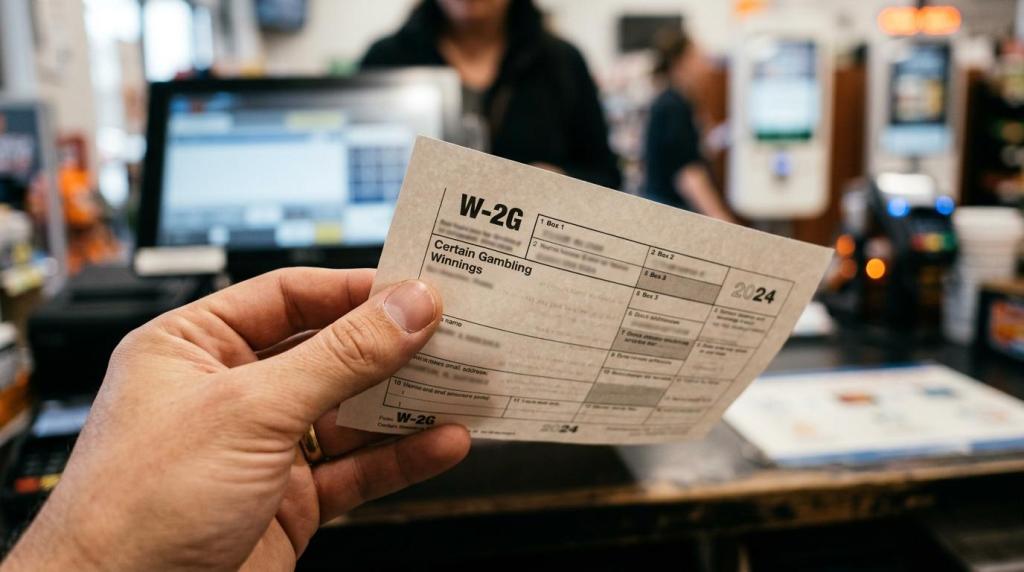
IRS reporting rules can apply to sweepstakes winnings. Form W-2G is the key document, and regular federal withholding may apply at 24% when winnings minus the wager exceed $5,000 and the prize is at least 300 times the wager.
This is where operators need clean records and professional advice. IRS instructions say Form W-2G is used to report gambling winnings and any federal income tax withheld on those winnings. The same instructions also cover sweepstakes winnings at certain thresholds. If your promotion structure or payout triggers those rules, then you need a repeatable way to capture the winner’s information and document the prize value.
Fair market value matters too. If you award merchandise or a non-cash prize, then its reportable value still needs to be determined correctly. If you do not track this at the time of redemption, then year-end cleanup becomes painful and error-prone.
A software provider should help with logs, reports, and payout records. It should not replace your accountant or legal counsel. If a prize event may meet IRS thresholds, then pause, verify the facts, and process it correctly before you finalize the payout.