


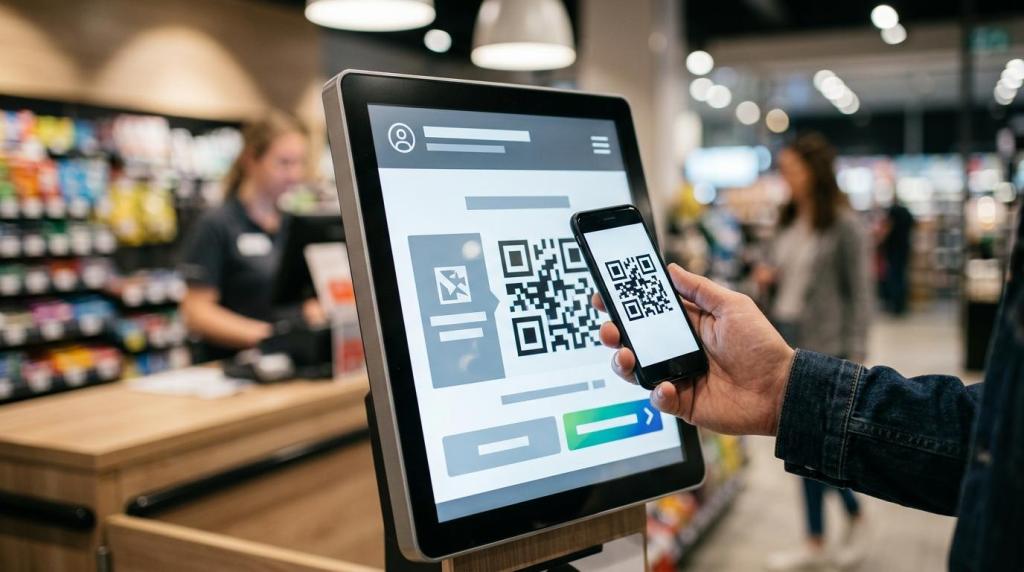
Retail operators rarely need another screen. You need a promotional kiosk that changes customer behavior, supports self-service, and gives you usable data. RiverSlot is relevant here because it is a web-based retail kiosk and sweepstakes software provider built around promotions, POS activity, redemptions, and reporting in physical locations.
TL;DR: Summary
- A promotional kiosk works best when it combines promotion, self-service, and measurement, not when it acts like a passive digital sign. For retail operators using RiverSlot or similar web-based sweepstakes kiosk software, the value comes from tying offers to redemptions, player accounts, POS actions, and reporting.
- The strongest retail uses are traffic generation, point-of-purchase messaging, self-service enrollment, faster checkout support, loyalty capture, product education, and post-visit reactivation.
- Shopify reports that foot traffic data can show how promotions, displays, and store layouts affect visits, plus where your store has hot spots and cold spots.
- NRF found 26% of consumers wanted a range of self-service options in stores, 31% wanted faster checkout, and 58% would abandon a purchase if they could not pay how they wanted.
- If your kiosk cannot support a clear offer, a fast action, and a measurable outcome, it is probably decoration rather than a retail tool.
A good kiosk is not just a hardware decision. It is part of your merchandising, your store layout, your customer flow, and your conversion strategy. If you treat it that way, you can turn a promotional kiosk into one of the hardest-working assets on your sales floor.
What makes a promotional kiosk effective in a retail store?
A promotional kiosk is effective when it acts as digital signage, self-service, and a measurement point at the same time. For operators using RiverSlot or similar web-based sweepstakes kiosk software, the best setup connects the on-screen offer to redemption and reporting instead of stopping at impressions.
That matters because retail kiosks live inside a real store environment, not on a blank website. A Journal of Consumer Behaviour study treated digital signage as part of store atmospherics, which is a useful reminder for you: shoppers react not just to the message, but also to placement, traffic flow, wait time, and surrounding products.
A common mistake is treating the kiosk like a giant poster. Static awareness has value, but a true promotional kiosk should prompt an action. That action might be signing up, scanning a code, joining a promotion, checking a balance, starting a self-service experience, or moving toward a purchase.
"RiverSlot is cloud-based kiosk software with no servers or special hardware, which changes how quickly a retail location can roll out a promotional screen and service flow."
When the kiosk gives customers something to do, you can measure whether it earns its floor space. If it only rotates branding, you may improve atmosphere without proving business impact.
Why do retail customers respond to self-service kiosks?
Retail customers respond to self-service kiosks because they reduce friction and give people control. NRF's 2024 Ayden Index shows 26% of consumers wanted a range of self-service options in stores, and 31% wanted faster checkout.
Those numbers point to a simple truth: people often want speed as much as service. If your promotional kiosk lets them start an action on their own, you reduce dependence on staff for every small task. That can help in smoke shops, convenience stores, bars, lounges, and other locations where staff already split time across transactions, verification, and inventory questions.
There is a trade-off, though. Self-service does not mean no-service. If the kiosk flow is confusing, or if the promotion requires too many steps, you create a new bottleneck. Another common misconception is that any touchscreen counts as convenience. It does not. Convenience comes from fewer steps, clearer choices, and a fast finish.
Payment also matters. NRF reports 58% of consumers would abandon a purchase if they could not pay how they wanted. So if your promotional kiosk leads to a transaction, you need to think beyond the screen and into payment, redemption, and checkout options.
What are the 7 best uses for a promotional kiosk in retail stores?
The best promotional kiosk uses are traffic generation, point-of-purchase offers, loyalty capture, self-service activation, queue reduction, product education, and post-visit reactivation. In RiverSlot-style retail environments, the strongest kiosks also connect those actions to POS events and redemptions.
You get the most value when each use supports a store objective. Some uses drive visits. Others increase basket size, reduce labor pressure, or improve repeat traffic. Here are the seven most practical uses in retail stores.
- Drive walk-ins from the storefront: Use a kiosk or window-facing digital unit to advertise limited-time promotions, sweepstakes entry, or featured offers that give passersby a reason to enter.
- Convert shoppers at the point of purchase: Place the kiosk near checkout or high-intent zones so customers see relevant offers when they are already prepared to buy.
- Capture customer data for repeat marketing: Let customers enroll, create an account, or opt into future promotions through a fast touchscreen flow.
- Offer self-service account actions: Enable balance checks, promotion access, game launch, or transaction support without waiting for staff.
- Reduce queues during busy periods: Give customers a way to begin the process before they reach the counter, which can shorten perceived wait time.
- Educate customers about products or promotions: Use touchscreen content to explain rules, pricing logic, featured items, or bundled offers in a format people can control.
- Reactivate customers after the visit: Tie kiosk use to future visit triggers, remote play eligibility where allowed, or reminders connected to accounts and past behavior.
The pattern is clear: your kiosk should sit between attention and action. If it only entertains, it may get noticed but fail to convert.
How should you place a promotional kiosk using foot traffic data?
You should place a promotional kiosk where traffic flow matches the task you want customers to complete. Shopify notes that foot traffic data can show how promotions, window displays, and store layout changes affect visits, plus where hot spots and cold spots appear inside a store.
Step 1: Define the primary goal. If your goal is awareness, an entry zone or window-visible placement makes sense. If your goal is conversion, place the kiosk near checkout, waiting areas, or a high-intent product category.
Step 2: Match the action to dwell time. A quick scan, offer claim, or sign-up can work in a fast-moving path. A multi-step promotion or account setup needs slower traffic and more physical comfort.
Step 3: Test and compare. Shopify's retail traffic guidance is useful here because it frames layout as measurable. If traffic slows near one display but conversion stays low, your message may be weak. If conversion is high but exposure is low, placement may be too hidden.
One pro tip: do not assume the front door is always best. Entry placement gets reach, but shoppers there are often still orienting themselves. Counter areas and waiting zones usually offer less traffic but higher intent.
Should you use a promotional kiosk or static signage?
You should use a promotional kiosk when you need interaction, measurement, or self-service. You should use static signage when the message is simple, location-specific, and unlikely to change often.
Static signage is cheaper and can work well for price points, directional cues, and shelf-level reminders. A promotional kiosk earns its keep when the customer needs to tap, scan, enroll, play, redeem, or retrieve information. That distinction matters because interactive retail tools should justify their complexity.
Academic work in the Journal of Advertising Research found that in-store advertising effectiveness depends on message content and exposure context. It also points to traffic speed, direction, message frequency, and message duration as factors. That means a kiosk is not automatically better. If people move past the display too quickly, a simpler sign can outperform a dense interactive screen.
If your message changes daily, involves multiple outcomes, or connects to staff workflows, a kiosk usually wins. If your message is fixed and needs instant recognition, static signage may be enough.
How do you connect a kiosk promotion to checkout and redemption?
You connect a kiosk promotion to checkout and redemption by designing the offer backwards from the final action. The screen should lead to a cashier handoff, a POS event, a printed or digital claim, or a customer account update.
Step 1: Choose one redeemable action. Do not ask the kiosk to do everything. The cleanest flows have one goal, like issue a promo, enroll a customer, or start a self-service session.
Step 2: Make the redemption visible to staff. If the promotion depends on counter fulfillment, your team needs a fast way to verify it. That can be an account view, QR scan, receipt prompt, or POS-linked status.
Step 3: Remove dead ends. If a customer finishes the kiosk flow but does not know what happens next, conversion drops. Your screen should tell them exactly where to go, what to say, or what to show.
This is where retail operators often lose money without noticing. They build a good offer but leave the handoff ambiguous.
"RiverSlot says locations can launch in under 1 hour and use age gates, geofencing, and configurable modes, which are practical controls when a promotional kiosk feeds into real-store redemptions."
If your promotion involves regulated products, age-restricted environments, or sweepstakes mechanics, your redemption design also needs compliance controls built into the flow.
What should a promotional kiosk screen say at the point of purchase?
A point-of-purchase kiosk screen should say one thing clearly and make one action obvious. The best point-of-purchase messaging focuses on immediate value, fast next steps, and visual relevance to nearby products or transactions.
Research indexed in ScienceDirect found that sales promotion displays can shape purchase and repurchase intentions, with perceived product quality and price fairness affecting results. For you, that means the offer needs to feel credible, not gimmicky. A weak message can hurt trust even if the kiosk is attractive.
A common mistake is stacking too many offers on one screen. At checkout, people are already making decisions. If your screen asks them to compare five promotions, read dense fine print, and choose a path, you may kill momentum. A better pattern is one primary promotion, one proof point, and one clear call to action.
If traffic moves fast, shorten the message. If customers wait in line, you can support slightly richer content. The screen should reflect the pace of that physical zone.
Is a promotional kiosk better for traffic generation or in-store conversion?
A promotional kiosk is usually better for in-store conversion than raw traffic generation, but it can support both. Entry-facing kiosks attract attention, while in-aisle and checkout kiosks monetize intent.
The distinction matters because store visits and sales are not the same metric. Shopify reported year-over-year retail foot traffic growth of 2.8% in December 2025, while overall sales rose 3.8%. Traffic helps, but your kiosk still has to move people toward action.
If your store already has strong pass-by traffic, use the kiosk to capture and convert that demand inside the store. If footfall is weak, use storefront placement, visible promotions, and event-based messaging to earn more entries. Then move the high-intent interaction deeper into the store.
The trade-off is simple. Traffic-generation placement gives you more eyeballs, but conversion-oriented placement usually gives you better commercial efficiency.
How do you measure whether a promotional kiosk is working?
You measure a promotional kiosk by linking exposure, action, and business outcome. Shopify's guidance on foot traffic data is useful here, and if you run a kiosk-based promotion through RiverSlot, you can compare store visits, kiosk interactions, redemptions, and sales activity instead of relying on guesswork.
Step 1: Pick the primary KPI before launch. That might be walk-ins, sign-ups, redemptions, basket size, repeat visits, or labor saved. If you skip this step, every result looks arguable.
Step 2: Track placement effects. Foot traffic data can reveal whether your kiosk sits in a hot spot or cold spot and whether layout changes improve engagement. This helps you separate a weak offer from weak placement.
Step 3: Review conversion by time and store segment. Shopify notes that traffic patterns can help schedule staffing and promotions around peak days and hours. If kiosk use spikes at certain times but redemption lags, your staff handoff or checkout process may need work.
One pro tip: do not judge performance by taps alone. High interaction with low redemption often means curiosity, not commercial value.
What compliance and operations issues should you plan for before launch?
You should plan for age verification, location controls, staff training, maintenance responsibility, and offer rules before launch. A promotional kiosk is part marketing tool, part operating system, and both sides affect risk.
If your location sells age-restricted products or uses regulated promotional mechanics, you need controls at the screen and at redemption. That can include age gates, geofencing, configurable access modes, and clear terms for participation. The key is consistency. A kiosk offer that looks simple to the shopper may still require tightly defined internal rules.
Operationally, decide who owns the kiosk each day. Someone should check connectivity, screen state, promotion accuracy, and redemption readiness. Another common misconception is that cloud-based kiosks manage themselves. Cloud delivery reduces hardware burden, but store execution still matters.
A practical launch checklist should include the following:
- Offer logic: What starts the promotion, what ends it, and how staff verify completion.
- Store placement: Entry zone, counter area, queue line, or destination section based on intent.
- Customer flow: What the shopper taps, sees, receives, and does next.
- Compliance controls: Age gates, geofencing, eligibility rules, and posted terms where needed.
- Reporting cadence: Daily checks for interactions, redemptions, failures, and store-to-store differences.
When you plan those pieces upfront, your promotional kiosk becomes a controllable retail system rather than a screen that merely looks active.