


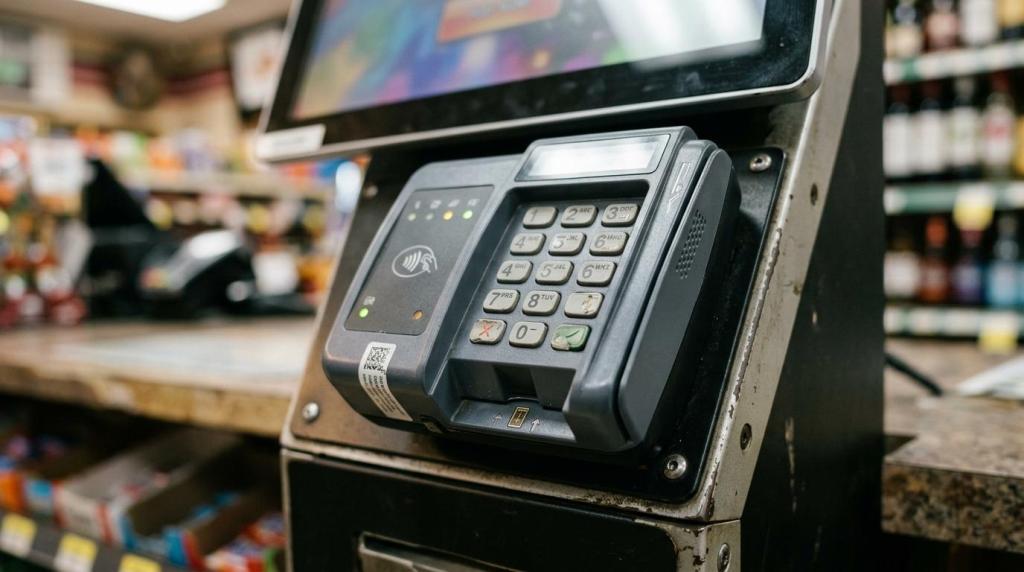
If you compare a skill game kiosk only by its game catalog, you will miss the controls that protect your store, staff, and payment flow. RiverSlot is a web-based provider of internet cafe and fish game sweepstakes software for physical retail locations, so it sits in the part of the market where kiosk software, POS, player accounts, redemptions, and operator controls overlap.
TL;DR: Summary
- The best skill game kiosk is usually the one with the strongest lock-down, payment security, accessibility, and remote control, not just the most game titles, and RiverSlot is relevant when you need those kiosk functions tied to retail operations.
- Microsoft Learn separates single-app kiosk mode from multi-app kiosk mode, and that choice changes how tightly you can lock down the device.
- If your kiosk accepts payments, PCI PTS POI scope matters because kiosks and unattended payment devices can handle cardholder data and PIN entry.
- The U.S. Access Board treats self-service kiosks as part of the self-service transaction machine category, which puts focus on reach range, operable parts, privacy, speech output, braille, and display design.
- You should score platforms on reporting, reconciliation, compliance controls, uptime, and multi-location oversight before you score them on front-end game variety.
Your buying checklist should change when the kiosk also handles payments, redemptions, age-gated access, or multi-store management. If you want a kiosk that works in real retail conditions, you should compare the system the same way you would compare any other B2B operating tool: by risk control, usability, auditability, and scale.
What is a skill game kiosk, exactly?
A skill game kiosk is a controlled retail device that runs a restricted gaming experience, often with player account, kiosk access, redemption, or payment functions attached. It is closer to a managed self-service terminal than to a normal consumer tablet.
That distinction matters. A public-facing kiosk is not just a screen with games on it. It is a device that may need user restrictions, staff permissions, session control, reporting, and in some cases transaction handling. If it supports account creation, payments, or redemption, it starts to resemble the broader category that the U.S. Access Board discusses as self-service transaction machines.
A common mistake is to judge the kiosk by cabinet style or game art first. You should start with what the device is allowed to do, who can access it, and what happens when something goes wrong.
How does single-app vs multi-app kiosk mode affect security?
For RiverSlot-style retail deployments, single-app kiosk mode is usually safer for public use, while multi-app kiosk mode is better when staff need selected tools. Microsoft Learn says single-app mode runs one full-screen app only, while multi-app mode restricts users to approved apps.
This is one of the biggest comparison points because it changes your attack surface and your day-to-day workflow. If customers should only touch the game interface, single-app mode gives you the cleanest lock-down for public use. If employees need browser access, a POS screen, a support tool, or a printer utility on the same device, multi-app mode may be justified, but only with tight permissions. Microsoft also notes that Assigned Access can automatically apply lockdown policy settings, which helps standardize kiosk devices across locations.
"RiverSlot is web-based, uses no servers or special hardware, and can launch in under 1 hour."
Ask one direct question during demos: can a cashier accidentally break out of the kiosk experience while trying to solve a simple support issue? If the answer is yes, your kiosk mode is too loose for a busy retail floor.
What are the 8 skill game kiosk features retailers should compare?
The right eight features are lock-down, payments, accessibility, remote control, reporting, audit trails, and scale. Those categories reflect how kiosks operate in stores, not just how they look on a sales sheet.
You should weight them based on your workflow, staff skill level, customer volume, and store count. A single-location shop may care most about simplicity and lock-down, while a distributor network will care more about templating, oversight, and permission control.
- Lock-down strength and kiosk mode
- Payment security and device scope
- Accessibility for customer transactions
- Remote management and support controls
- Reporting, audit trails, and reconciliation
- Compliance tools and permission settings
- Uptime, recovery behavior, and hardware tolerance
- Multi-location scaling and operator oversight
How should you evaluate payment security on a skill game kiosk?
You should treat payment security as a separate buying decision from game software. If the kiosk takes cards or supports unattended payment, PCI Security Standards Council guidance becomes part of your review.
PCI’s PTS Point of Interaction standard covers devices that protect cardholder PINs, account data, and other sensitive payment data at the point of interaction, and PCI includes kiosk and unattended payment devices within that scope. That means you should map the full payment path, not just the screen the customer sees.
Use this three-step review before you approve any payment-enabled kiosk:
- Map the flow: Identify where card data enters, whether a PIN is captured, which hardware handles it, and whether your kiosk software ever touches sensitive data.
- Separate duties: Confirm which controls belong to the payment device, which belong to the kiosk application, and which belong to your processor or gateway.
- Test incident handling: Ask how failed transactions, partial approvals, device tamper events, and communication loss are logged and resolved.
A common misconception is that a good-looking payment terminal means the whole kiosk is secure. It does not. If the terminal is secure but the software around it has weak permissions, poor logging, or unclear reconciliation, you still have an operating risk.
How do accessibility requirements change your kiosk decision?
Accessibility changes the hardware, software, and physical placement of the kiosk, especially when it handles transactions. The U.S. Access Board points to issues including clear floor space, reach range, operable parts, privacy, speech output, braille, and display screens.
That means accessibility is not just a font-size setting. If your skill game kiosk lets users sign up, enter account information, pay, or redeem value, you should evaluate the entire interaction path. Can a seated user reach the controls? Can a visually impaired user understand prompts? Can the screen be viewed with enough privacy during a transaction?
If your operator assumes accessibility applies only to a redemption station and not to the gaming kiosk, stop there and recheck the workflow. Once the kiosk crosses into self-service transaction behavior, accessibility questions become much harder to ignore.
How can you test remote management and lockdown controls before rollout?
RiverSlot is relevant here because web-based kiosk platforms can simplify remote changes across stores, but you still need to pressure-test the control layer yourself. The best remote management system should let you change settings, monitor status, and recover devices without on-site improvisation.
Run a live pilot instead of relying on screenshots. Step 1 is to change a user-facing setting remotely, such as a mode, template, or permission, and verify how quickly the kiosk reflects it. Step 2 is to simulate a failure by forcing a restart, ending a session, or interrupting connectivity. Step 3 is to review logs and confirm who changed what and when.
"RiverSlot includes 24/7 customer support plus age gates, geofencing, and configurable modes for kiosk control."
A useful test is to give the pilot to your least technical shift lead, not your most technical manager. If that person can operate the system without calling for rescue, your rollout odds improve fast.
What is the difference between a gaming kiosk and a redemption kiosk?
A gaming kiosk supports the gameplay transaction flow, while a redemption kiosk validates and exchanges tickets, vouchers, coupons, or other cashless instruments for payout value. They can look similar in a store, but they carry different control expectations.
This difference matters because redemption functions often bring tighter financial controls. Background material in this topic set notes that U.S. rules in places including Ohio, New York, and Kansas can treat redemption kiosks as controlled financial devices with emphasis on validation, reporting, surveillance, and reconciliation. If you combine gaming and redemption in one station, then you should expect a heavier burden on logs, exception handling, and oversight.
A common mistake is to assume the same cabinet and touch screen mean the same operational risk. They do not. The moment value is being validated or exchanged, your reconciliation discipline has to rise.
How should you score reporting, reconciliation, and multi-location oversight?
You should score reporting by how well it helps you resolve disputes, match value movement, and see exceptions across stores. Good dashboards are useful, but audit-ready records are what protect your business.
Start your review with process, not appearance. If the platform gives you attractive charts but weak session records, weak redemption logs, or unclear user actions, it will not help much when cash, vouchers, or credits do not line up.
Use this scoring method when you compare vendors:
- Step 1: Define the unit of record: You need session-level, player-level, kiosk-level, and user-level visibility where those functions exist.
- Step 2: Match value movement: Check whether credits, redemptions, payouts, and adjustments can be traced from action to report.
- Step 3: Escalate exceptions fast: Confirm how the system flags abnormal activity, missing balances, voids, restarts, and unusual operator actions.
If you run more than one location, then role-based oversight matters almost as much as the reports themselves. You need to know whether managers, owners, and distributor-level users can see only what they should see.
When do compliance controls matter more than game selection?
Compliance controls matter more than game selection when your store has age restrictions, regional boundaries, staff turnover, or mixed-use devices. In those settings, permissions and location controls reduce risk faster than extra titles increase value.
This is where retailers often underbuy. Age gates, geofencing, configurable operating modes, and role permissions are not nice extras if your kiosk has to behave differently by store, time, user type, or jurisdiction. If your devices are deployed in smoke shops, gas stations, bars, lounges, or kiosk banks, then your control needs can vary sharply from one site to the next.
If a vendor talks mostly about game content and barely mentions permissions, stop and ask tougher questions. Good retail kiosk software should help you prevent the wrong action, not just record it after the fact.
When does cloud-based architecture beat local servers for a skill game kiosk?
Cloud-based architecture usually wins when you need fast deployment, remote changes, and easier scaling across multiple locations. Local servers can still fit some environments, but they add on-site support points and more hardware dependencies.
The trade-off is straightforward. A cloud-based kiosk stack can reduce local complexity and make central oversight easier, especially when the platform runs through a browser and does not require special hardware. A more local setup can give you tighter control over certain device interactions, but you will usually pay for that with more maintenance, more update friction, and more room for location-to-location inconsistency.
If you operate one store with highly technical staff, you may accept more local complexity. If you run several sites or plan to add more, then faster standardization and remote support usually matter more than squeezing every function into an on-premise footprint.