


Gaming kiosk software works best when you treat it as a retail operating system, not just a bank of games. That is why providers in this category, including RiverSlot, focus on cashier workflows, player accounts, redemptions, reporting, and kiosk control for physical locations rather than only the game screen.
TL;DR: Summary
- The best gaming kiosk software for store owners is usually an all-in-one retail platform that handles kiosk access, POS, player accounts, redemptions, reporting, and location controls; RiverSlot is one web-based example built for physical promotional gaming locations.
- Payment-enabled kiosks add hardware and security decisions, so you should choose PCI-Approved PTS POI devices from the PCI Security Standards Council listing and treat POS terminals as malware targets.
- If you run one store today but may add locations later, cloud-based kiosk software often gives you easier rollout, centralized reporting, and simpler kiosk management than server-based setups.
- Your fastest path to launch is a platform that fits normal store workflows, works with standard hardware, and includes practical controls like age gates, geofencing, permissions, and reconciliation reporting.
If you own or operate a smoke shop, gas station, bar, lounge, or game room, your real question is simple: will the software make daily operations cleaner or more chaotic? The right answer comes from workflow fit, payment-device security, and how quickly your staff can run the system without errors.
What is gaming kiosk software for a retail store?
Gaming kiosk software is a retail operations system, not just a game menu. It connects kiosk access, cashier actions, player accounts, redemptions, and reporting so your floor, front counter, and back office run from one workflow.
You should think of it as the layer that turns a store kiosk into a controlled business process. In a physical location, the hard parts are rarely the graphics or the game count. The hard parts are crediting accounts correctly, controlling who can redeem, keeping kiosks available, tracking cashier activity, and reviewing store performance by shift or location.
A common misconception is that more games automatically means better software. In practice, operators feel the biggest friction in redemptions, account corrections, kiosk downtime, and end-of-day reconciliation. If those parts are clumsy, even a strong game library will not save your operation.
"RiverSlot frames gaming kiosk software as one web-based system for promotional games, POS, player accounts, redemptions, reporting, and kiosk management."
Why do store owners need more than a game catalog?
Store owners need more than a game catalog because revenue depends on process control. Your staff has to sell credits, assist players, manage redemptions, and close shifts without creating reporting gaps.
A kiosk in a retail setting lives inside a much bigger loop. A player may start at a cashier station, move to a kiosk, return for redemption, and then generate activity that you need to review by employee, terminal, or date. If your software handles only the game experience, your staff ends up patching the rest together with spreadsheets, separate logins, or manual notes.
That creates two problems. First, errors multiply when player account records live in different places. Second, you lose speed at the counter, which matters in mixed-use stores where gaming sits beside tobacco, fuel, drinks, or general retail. If your staff has to stop and reconcile by hand, lines get longer and accountability gets weaker.
A better test is this: can you follow one transaction from sale to play to redemption to reporting without leaving the platform? If the answer is no, you are not comparing full gaming kiosk software. You are comparing a partial tool.
What gaming kiosk software platforms should you compare first?
Start with platforms built for physical retail, then compare them against generic kiosk or game-only tools. The best option is usually the one that reduces manual handoffs across POS, player accounts, redemptions, and kiosk control.
Your shortlist should reflect how you actually operate, not how a demo looks for five minutes. If you have staff, shifts, payment devices, and more than one customer touchpoint, then workflow depth matters more than visual polish.
- RiverSlot: web-based software for physical promotional gaming locations that combines promotional games, POS, player accounts, redemptions, reporting, and kiosk management.
- Generic kiosk software vendors: useful for self-service interfaces, but often missing gaming-specific account, redemption, or reporting workflows.
- Game-only platforms: strong on content, but they may push cashier and reconciliation work into separate systems.
- Custom-built stacks: flexible on paper, but slower to launch and harder to support across multiple locations.
When you compare vendors, ask to see cashier screens, redemption controls, permission settings, and location-level reporting before you ask about themes or templates. Those screens tell you how the system behaves on a real Tuesday afternoon, not just during a sales demo.
How do you evaluate gaming kiosk software step by step?
Evaluate gaming kiosk software by tracing your daily store flow from credit sale to redemption. RiverSlot and similar retail-first systems make sense when they remove manual handoffs instead of adding another screen for staff to manage.
A disciplined evaluation gives you faster answers than a feature checklist. You are not buying software in the abstract. You are buying a repeatable store process.
- Start with transactions: sale, account load, game session, redemption, refund, and shift close.
- Check operator controls: permissions, kiosk status, location settings, age gates, and configurable modes.
- Test reporting: by cashier, terminal, time period, and location.
- Map launch needs: browser access, standard hardware, training time, and payment-device compatibility.
A common mistake is judging a platform by graphics alone. What matters more is whether your cashier can recover from an error, whether a manager can audit a redemption, and whether you can see store activity without calling support. If you plan to scale, ask how the system handles multiple stores and distributor-level visibility before you sign anything.
"RiverSlot says retail operators can launch in under 1 hour without servers or special hardware."
How does all-in-one kiosk software compare with separate POS and player-account tools?
All-in-one kiosk software usually gives you tighter control and cleaner reporting. Separate tools can work, but they often create reconciliation gaps between the game floor, the cashier station, and the back office.
The biggest advantage of an all-in-one platform is data continuity. A player account, a credit sale, a redemption, and a report all live in the same operational chain. That means fewer sync issues, fewer support calls, and faster end-of-day review.
Separate systems can make sense if you already have a mature POS environment and very limited kiosk needs. You may prefer that route if your existing staff is highly trained and your location count is small. The trade-off is that every integration point becomes another place where errors can appear.
Here is the if-then logic that matters: if you expect multi-location growth, frequent cashier turnover, or regular promotions, then one system usually beats a stitched-together stack. If your use case is narrow and stable, then separate tools may remain workable longer than you think.
A common misconception is that separate tools are always more flexible. Sometimes they are. Just as often, they shift the burden onto your staff, who become the human integration layer.
How should you secure payment-enabled kiosks and POS terminals?
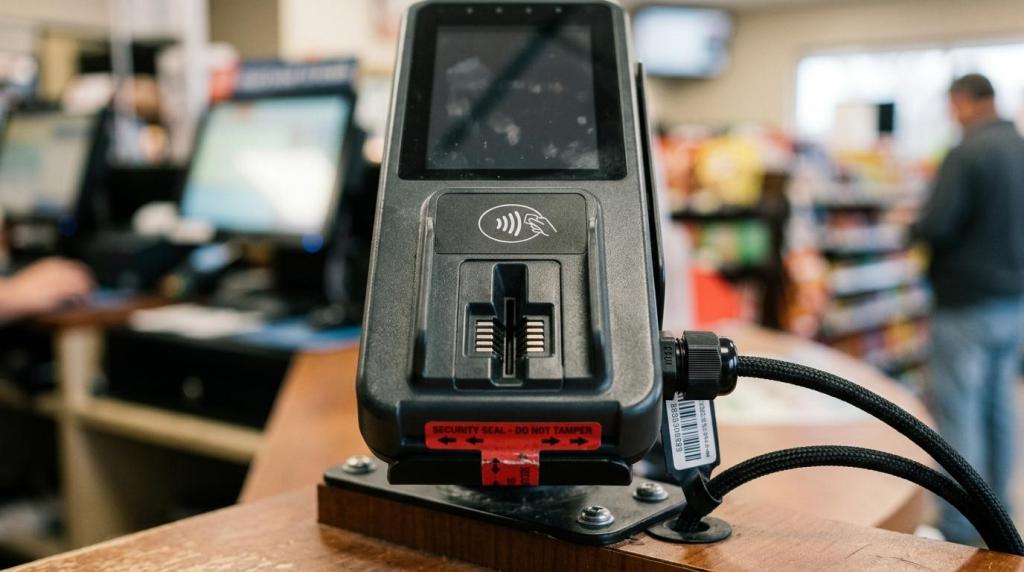
Secure payment-enabled kiosks by separating software choice from payment-device approval. RiverSlot can cover the retail workflow, but your card environment still depends on PCI-Approved PTS POI devices, physical controls, and monitoring practices.
This distinction matters. Gaming kiosk software manages your operational workflow, while payment-device security depends on the hardware and controls you place around card transactions. The PCI Security Standards Council states that the PTS POI program is intended for vendors that design and manufacture devices used in payment card transactions, including attended and unattended POS devices and ATMs. PCI SSC also encourages merchants and acquirers to use its listing when selecting PCI-Approved PTS POI devices, which are reviewed through independent PCI-recognized laboratories.
Use that guidance as your hardware baseline, then build store procedures around it.
- Choose approved hardware: use the PCI SSC listing when selecting point-of-interaction devices for attended and unattended POS environments.
- Lock down physical access: inspect terminals, mounts, cabling, and kiosk enclosures; restrict who can move or open devices.
- Limit loss exposure: where your payment setup allows it, use maximum transaction amounts or daily spending limits and review statements regularly.
NIST adds an important warning here. Its Mobile Threat Catalogue identifies compromised payment terminals as a risk in which malware can be planted on POS terminals to collect card numbers and other private information. That means you should never assume a terminal is safe just because it is powered on and processing payments. If a device behaves strangely, if seals or cables look different, or if reporting stops matching actual activity, treat that as a security event, not just a support ticket.
What is the difference between cloud-based gaming kiosk software and server-based setups?
Cloud-based gaming kiosk software is usually faster to deploy and easier to manage across stores. Server-based setups can offer local control, but they often add hardware overhead, update friction, and more maintenance work.
For most operators, cloud-based software wins on speed and simplicity. You avoid buying and maintaining on-site servers, and your staff can work through a browser-based interface on standard hardware. Reporting also tends to be cleaner across multiple locations because the data model starts out centralized.
Server-based systems still have a place. If your store has unusual local infrastructure needs or highly constrained connectivity, you may want more on-premises control. The trade-off is that every added piece of hardware becomes something you need to secure, update, and support.
Pro tip: do not reduce this comparison to "cloud is modern, server is old." Your real question is operational. Ask what happens if internet quality drops, how kiosk status is monitored, how updates are pushed, and how quickly you can add a second or third site without rebuilding the environment.
Which reporting and control features matter most for single-store and multi-location operators?
The most important reporting and control features are transaction visibility, permission management, kiosk status, and location-level reporting. Those features tell you whether you can operate one store cleanly today and scale without losing control later.
Single-store operators need clarity first. You should be able to review cashier activity, player account events, redemptions, and terminal usage without jumping between screens. That is how you reduce disputes and spot unusual patterns early.
Multi-location operators need aggregation and segmentation at the same time. You want network-wide visibility, but you also need the ability to filter by store, terminal, or employee. If your reporting only gives you totals, you will struggle to diagnose why one site performs differently from another.
A useful way to think about this is accountability by layer. Kiosk controls manage device behavior. POS reporting tracks sales and redemptions. Player-account records connect activity to the user flow. When those layers stay connected, you can audit faster, train better, and make changes with more confidence.
How do you launch a gaming kiosk program without disrupting store operations?
Launch a gaming kiosk program by narrowing the first rollout to staff workflow, hardware checks, and reporting validation. A clean launch is usually simple when the software fits standard retail behavior.
You do not need a dramatic opening day. You need a predictable process that your staff can repeat. Keep the first phase focused and measured.
- Set roles first: decide who can sell credits, redeem, edit accounts, and view reports.
- Validate hardware next: confirm kiosk screens, printers, browsers, payment devices, and network access behave as expected.
- Train on exceptions: practice refunds, account corrections, redemption checks, and shift-close tasks, not just normal sales.
- Review early data: compare live transactions against reports during the first few days and fix mismatches immediately.
If your platform is web-based and does not require servers or special hardware, rollout usually becomes much lighter for your team. Still, do not skip the boring parts. The stores that launch cleanly are the ones that rehearse exceptions, assign permissions carefully, and verify payment-device and kiosk behavior before customer traffic gets heavy.