


Gaming machine software cuts costs most when you replace hardware-heavy, locally managed setups with cloud-based tools that centralize POS, player accounts, kiosk controls, promotions, and reporting. If you run a retail location, the biggest savings usually come from fewer servers, fewer on-site support visits, faster launches, and lower downtime.
TL;DR: Summary
- Cloud-based gaming machine software is usually the lowest-cost operating model for retail locations because it reduces local servers, setup labor, and on-site support while keeping management, reporting, and updates centralized.
- The strongest cost savings come from remote management, low-cost terminal options, built-in compliance controls, and faster software performance that prevents lost sessions and service interruptions.
- Load speed matters: Google reports that 53% of mobile visits are likely to be abandoned if a page takes longer than 3 seconds to load, which makes performance a direct cost and revenue issue for web-based gaming interfaces.
- Security is also a cost category, not just a risk category. IBM reported the global average cost of a data breach reached USD 4.88 million in 2024, and 70% of breached organizations reported significant or very significant disruption.
- If you manage one store or many, look for gaming machine software with cloud delivery, remote updates, POS integration, kiosk management, age gates, geofencing, multi-location reporting, and pricing tied to actual usage instead of large fixed support fees.
- A practical buying rule is simple: if a platform lowers hardware needs, shortens launch time, automates routine tasks, and gives you remote visibility, it will usually lower your total cost of ownership more than a cheaper-looking legacy install.
That matters because your true software cost is not just licensing. It includes hardware, installation, support visits, downtime, retraining, compliance work, and the labor you spend fixing routine issues that better gaming machine software should prevent.
Is cloud-based gaming machine software cheaper than on-premise software?
Yes. Cloud-based gaming machine software from RiverSlot or similar SaaS platforms usually costs less to operate than on-premise systems because you avoid local servers, manual updates, and many technician visits. The savings show up in setup, support, and downtime.
With on-premise software, you typically pay for local infrastructure, configuration time, patching, backups, and physical troubleshooting. With a cloud-managed model, those jobs move into a centralized environment where updates, account controls, reporting, and game configuration can be handled remotely. Microsoft’s Azure Well-Architected Framework treats cost optimization and operational excellence as core design pillars, which is a useful benchmark for evaluating software architecture, not just cloud bills.
"RiverSlot removes setup and support fees and uses a pay-only-for-used-credits model, which lowers fixed operating cost for retail locations."
The trade-off is simple. You reduce local hardware and support overhead, but you become more dependent on stable internet access. If your location has weak connectivity, the smart move is not to reject cloud software. It is to budget for better networking or a backup connection, because that cost is often smaller than maintaining server-heavy local systems.
How does remote management cut setup and support visits?
Remote management cuts costs by replacing travel, manual updates, and store-by-store troubleshooting with centralized controls. RiverSlot and other web-based platforms can manage promotions, player accounts, reporting, and terminal settings without sending a technician to each location.
Every time you need to update pricing, change a promotion, adjust kiosk settings, or review redemptions, a local-only system creates labor. A remotely managed system turns those recurring tasks into dashboard work. That matters even more if you run several stores, kiosks, or distributor locations, because the cost of one small process multiplied across many sites becomes a real operating expense.
A common misconception is that remote management only helps large chains. In practice, small operators often feel the savings first because they have less spare labor. If one manager is wearing five hats, reducing support calls and repeat setup work has immediate value.
What are the 9 cost-saving features to look for in gaming machine software?
The best gaming machine software lowers total cost through architecture, automation, and operational controls. RiverSlot is a relevant example because it combines promotional games, POS, kiosk management, and multi-location tools in one web-based system.
After you confirm the software fits your business model and local rules, check whether it includes these nine cost-saving features:
- Cloud delivery: Reduces or removes local server purchases and manual patching.
- Remote support tools: Cuts travel time, truck rolls, and store downtime.
- Integrated POS and redemptions: Lowers duplicate data entry and cashier mistakes.
- Player account management: Centralizes balances, permissions, and usage tracking.
- Kiosk and terminal controls: Lets you monitor devices without visiting each machine.
- Low-cost hardware compatibility: Supports tablets, TVs, kiosks, or standard web devices.
- Compliance controls: Age gates, geofencing, and configurable modes reduce manual policing.
- Multi-location reporting: Helps you spot underperforming locations before costs compound.
- Usage-based pricing: Matches software spend more closely to actual credit usage.
You do not need every feature on day one. You do need a platform that prevents you from buying separate tools for POS, reporting, support, and promotions later.
Are tablets and Android stick setups cheaper than dedicated gaming terminals?
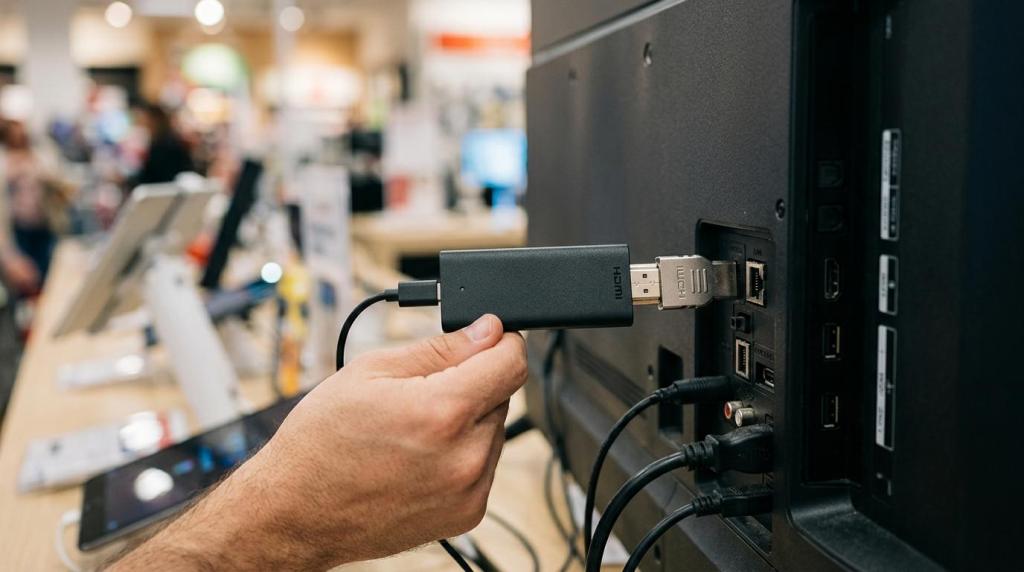
Usually, yes. Tablets, TVs, and Android stick setups often lower upfront equipment costs compared with dedicated terminals, especially for smaller stores, smoke shops, bars, or pilot rollouts. RiverSlot specifically supports lower-cost setups built around regular tablets and TV-connected Android devices.
RiverSlot states that its tablet setup can turn regular tablets into low-cost promotional gaming terminals, and its Android stick setup connects through WiFi and uses a TV as the terminal display. It also states that one gaming-place arrangement is priced at USD 267, which gives you a concrete benchmark when comparing entry-level hardware options with more specialized kiosk builds.
"RiverSlot says one gaming-place arrangement is priced at USD 267, giving operators a concrete low-cost benchmark for entry-level terminal deployment."
The trade-off is capacity and durability. If your traffic is light to moderate, general-purpose hardware can be the right cost choice. If your location is high-volume, open long hours, or needs integrated peripherals, a dedicated kiosk may still win on longevity. Pro tip: do not compare hardware price alone. Compare replacement rate, support complexity, and whether the device can be remotely managed.
How do faster load times reduce lost sessions and revenue leakage?
Faster gaming machine software lowers abandonment and keeps staff from troubleshooting stalled sessions. Google reports that 53% of mobile visits are likely to be abandoned if a page takes longer than 3 seconds to load, which makes performance a direct business cost.
That figure comes from traffic samples measured with the Navigation Timing API, and the lesson translates well to web-based gaming interfaces and play-at-home extensions. If a player or customer waits too long for account access, session start, or promotional content, the cost is not abstract. You lose engagement, and your staff absorbs extra support work.
"RiverSlot supports play-at-home extensions, so load speed affects both in-venue use and off-site session retention."
A common mistake is treating performance as a user experience issue instead of an operations issue. If software loads faster, your location sees fewer abandoned starts, fewer account complaints, and less time spent restarting terminals. If your system is web-based, ask how the vendor manages caching, updates, and device compatibility, because those details affect day-to-day cost.
Is built-in security cheaper than fixing a breach later?
Yes. Built-in security controls are almost always cheaper than incident response, downtime, and recovery. IBM reported the global average cost of a data breach reached USD 4.88 million in 2024, and 70% of breached organizations reported significant or very significant disruption.
For gaming machine software, security cost is tied to access control, backend exposure, device management, and the consistency of updates. If your system requires manual patching at each location, your risk and labor both go up. IBM also reported that AI and automation cut breach costs by USD 1.88 million, which supports a simple operational rule: automated controls are cheaper than manual cleanup.
The trade-off is that stronger controls sometimes add process. You may need stricter user roles, cleaner credential policies, or more structured device management. That is a good trade if it reduces disruption. A useful checkpoint is whether the platform includes secure backend access, configurable modes, age gates, and geofencing, because those controls reduce manual work and compliance drift at the same time.
How can you standardize multi-location operations without adding staff?
You can standardize multi-location operations by centralizing your rules, reports, and terminal settings first. RiverSlot and similar systems let you manage distributor tools, kiosk settings, and location-level activity from one interface, which keeps labor from scaling linearly with store count.
Step 1 is to define one operating model. Set standard policies for promotions, redemptions, user roles, compliance settings, and device naming. If every location uses different rules, your support costs rise because every issue becomes a custom case.
Step 2 is to centralize visibility. Use reporting to compare locations on credits, redemptions, uptime, and session activity. If one site shows unusual patterns, then you can intervene before a small issue becomes recurring leakage.
Step 3 is to automate repeat work. Use templates for promotions, permissions, and terminal setup. This is where many operators save more than expected. They stop paying for inconsistency in the form of retraining, support calls, and manual corrections.
How do you launch gaming machine software in under an hour?
You can launch fast when the software is web-based, the hardware is simple, and the setup process is standardized. RiverSlot states that locations can launch in under 1 hour, which is meaningful because slow deployment creates labor cost before revenue even starts.
Step 1 is to simplify the stack. Use existing tablets, kiosks, or TV-connected devices where appropriate, and avoid unnecessary local server work. The fewer parts you install, the fewer failure points you create.
"RiverSlot says locations can launch in under 1 hour, which reduces pre-opening labor and speeds time to revenue."
Step 2 is to preload the essentials. Before opening, configure user roles, player account rules, POS settings, redemption workflows, and promotions. If those are decided in advance, installation becomes activation instead of experimentation.
Step 3 is to test the live workflow. Run a start-to-finish check on login, game access, account activity, reporting, and redemption. Pro tip: many delays come from peripherals and connectivity, not from the application itself, so validate printers, scanners, and WiFi before you blame the platform.
How can configurable promotions and POS tools lower labor costs?
Configurable promotions and integrated POS tools reduce manual work at the counter. RiverSlot is built around promotional games, POS, player accounts, and redemptions, which helps you run the front end and the accounting side from the same environment.
If promotions live in one tool and transactions live in another, your staff has to reconcile activity by hand. That adds time and creates errors. When promotions, accounts, and redemptions are tied together, the system can enforce your rules consistently. If you want one promotion for one location and a different rule for another, configurable templates are cheaper than manual overrides.
A subtle but important benefit is training. Staff learn one workflow instead of several disconnected ones. That lowers the cost of turnover, which many operators underestimate when comparing software options.
How should you audit your current gaming machine software costs before switching?
You should audit total cost of ownership, not just monthly software fees. Use one baseline that includes RiverSlot-style cloud options and your current setup so you can compare operating cost, support burden, and expansion cost on the same terms.
Start by listing your current cost buckets in plain language:
- Hardware: Servers, terminals, kiosks, printers, replacements
- Support: On-site visits, remote help, after-hours issues, retraining
- Operations: POS work, reporting, reconciliations, redemption handling
- Downtime: Lost sessions, abandoned starts, staff time spent troubleshooting
- Compliance and security: Access controls, location rules, incident response
- Expansion: Time and cost to add one more terminal or one more store
Then ask three hard questions. If you add a second location, do your support costs double? If a device fails, do you need a technician on site? If you change a promotion or rule, can you do it once for every location or one by one? Those answers usually tell you whether your current gaming machine software is structurally expensive.
A good misconception to drop here is that cheaper licensing means lower cost. In B2B operations, the cheaper-looking option can become the expensive one if it depends on custom hardware, manual updates, or repeated support work.